RTSP Stream Stuck? Add a Video Watchdog for go2RTC
An RTSP port can accept connections while no usable video arrives. Checking whether port 8554 is open tells you that something is listening. It does not tell you that your camera stream can be decoded.
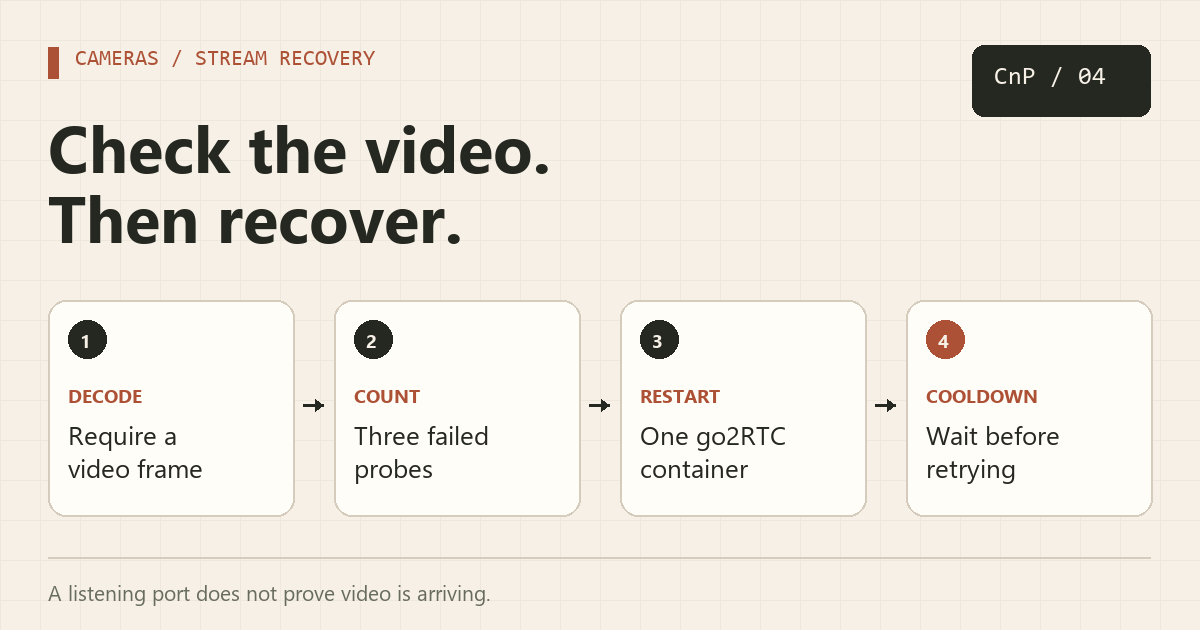
This Linux example probes the RTSP output from go2RTC with FFmpeg. After three consecutive failed probes, it restarts one go2RTC container and waits at least ten minutes before another restart. It is a recovery aid for missing or undecodable video. A camera that keeps sending a decodable but identical frozen image requires a different, scene-aware check.
1. Start with a known-good stream
You need Docker Compose, Bash, GNU timeout, FFmpeg, and a camera with an RTSP URL. On Debian or Ubuntu, install the host tools:
sudo apt update
sudo apt install ffmpeg coreutils
mkdir -p ~/go2rtc
cd ~/go2rtc
Save this as go2rtc.yaml. Replace the camera URL with the one documented for your model; this path is only an example.
streams:
  front_door: "rtsp://CAMERA_USER:CAMERA_PASSWORD@192.168.1.50:554/REPLACE_WITH_CAMERA_PATH"
Keep camera credentials private. Percent-encode reserved characters in the username or password when required by the URL parser, and use a camera account with only the permissions needed to view video.
Save the Compose file below. The localhost bindings let the host-side watchdog reach go2RTC while keeping these ports off the LAN. This minimal example covers RTSP testing, not a complete WebRTC deployment.
services:
  go2rtc:
    image: alexxit/go2rtc:1.9.14
    container_name: go2rtc
    restart: unless-stopped
    ports:
      - "127.0.0.1:1984:1984"
      - "127.0.0.1:8554:8554"
    volumes:
      - ./go2rtc.yaml:/config/go2rtc.yaml:ro
docker compose config --quiet
docker compose up -d
docker compose logs --tail 50 go2rtc
The pinned version is the official release checked while preparing this guide. Review the project's releases when updating. The read-only config mount means the web editor cannot save changes back to that file; edit it on the host and restart the service instead.
2. Verify decoding manually
Run this on the Docker host:
timeout --kill-after=5s 25s ffmpeg -nostdin -hide_banner -loglevel error -rtsp_transport tcp -i "rtsp://127.0.0.1:8554/front_door" -map 0:v:0 -frames:v 1 -an -progress pipe:1 -f null -
You should see progress containing frame=1 and the process should exit successfully. The command decodes one video frame rather than copying compressed packets. If it fails, fix the stream name, camera URL, network route, or codec support before enabling automatic restarts.
A 25-second timeout may be too short for a camera with a long keyframe interval or a slow connection. Increase it only after checking normal connection behavior.
3. Add consecutive-failure recovery
Save this as /usr/local/sbin/go2rtc-watchdog. Change the stream name and container name for your setup. Each failed probe is separated by 60 seconds; the probe itself can take up to 30 seconds including forced shutdown.
#!/usr/bin/env bash
set -Eeuo pipefail

STREAM_URL="rtsp://127.0.0.1:8554/front_door"
CONTAINER="go2rtc"
FAIL_LIMIT=3
COOLDOWN=600
failures=0
last_restart=0
progress=$(mktemp)
trap 'rm -f "$progress"' EXIT
log() { printf '%s %s\n' "$(date -u +%FT%TZ)" "$*"; }

while true; do
  : > "$progress"
  # Require successful decoding and a reported frame, not just an open socket.
  if timeout --kill-after=5s 25s ffmpeg \
      -nostdin -hide_banner -loglevel error \
      -rtsp_transport tcp -i "$STREAM_URL" \
      -map 0:v:0 -frames:v 1 -an \
      -progress pipe:1 -f null - > "$progress" 2>/dev/null &&
      grep -Eq '^frame=[[:space:]]*[1-9][0-9]*$' "$progress"; then
    if (( failures > 0 )); then log "Video decoding recovered"; fi
    failures=0
  else
    failures=$((failures + 1))
    log "Video probe failed ($failures consecutive failures)"
    now=$(date +%s)
    if (( failures >= FAIL_LIMIT && now - last_restart >= COOLDOWN )); then
      log "Attempting restart of $CONTAINER"
      # Cool down even if the restart command fails.
      last_restart=$now
      if docker restart --time 10 "$CONTAINER" >/dev/null; then
        log "Restart requested; next probe will check video"
      else
        log "Restart failed; inspect Docker and camera connectivity"
      fi
      failures=0
    fi
  fi
  sleep 60
done
The check suppresses FFmpeg's detailed errors during normal operation to avoid noisy logs and accidental disclosure of stream URLs. Re-run the manual command when diagnosing a failure. This watchdog restarts the whole proxy container, so every stream on that instance is briefly interrupted.
4. Run it as one supervised process
Make the script executable and save this unit as /etc/systemd/system/go2rtc-watchdog.service:
sudo chmod 750 /usr/local/sbin/go2rtc-watchdog
[Unit]
Description=go2RTC video decoding watchdog
After=docker.service network-online.target
Wants=network-online.target
Requires=docker.service

[Service]
Type=simple
ExecStart=/usr/local/sbin/go2rtc-watchdog
Restart=on-failure
RestartSec=30

[Install]
WantedBy=multi-user.target
sudo systemctl daemon-reload
sudo systemctl enable --now go2rtc-watchdog
sudo journalctl -u go2rtc-watchdog -f
The unit runs as root so it can restart Docker containers. Keep the script root-owned and writable only by administrators. Do not also schedule a second copy with cron. Failure counters and cooldown state are held in memory and reset when the watchdog process restarts.
Test recovery without disrupting important feeds
Use a spare camera or a test stream during a maintenance window. Temporarily make that test source unavailable, confirm the three failure messages, and confirm one restart attempt. Restore the source and look for successful video decoding. A disconnected camera will stay disconnected after a proxy restart; investigate its power, network, firmware, and connection limits.
If the proxy works but the NVR picture is still wrong, compare the direct camera stream with go2RTC's output. Our dual-lens camera guide covers a related feed-splitting setup.
Official references
About Copy And Paste
Just a curious soul dabbling in the world of IT. Exploring coding, sysadmin tricks, and tech automation — because who doesn’t love copying and pasting clean code that just works?
More in Software Install Tutorials
Run Uptime Kuma with Docker Compose and Test Your First Alert
Deploy Uptime Kuma with persistent storage, monitor a meaningful endpoint, and test both outage and recovery notifications.
Reach Your Homelab with Cloudflare Tunnel and Protect It with Access
Connect a private Docker service to a public HTTPS hostname without router port forwarding, then require an approved identity through Cloudflare Access.