Fixing Windows Printer Error 0x80040003 ("Your printer has experienced an unexpected configuration problem")
1. Symptom & Root Cause
Symptom
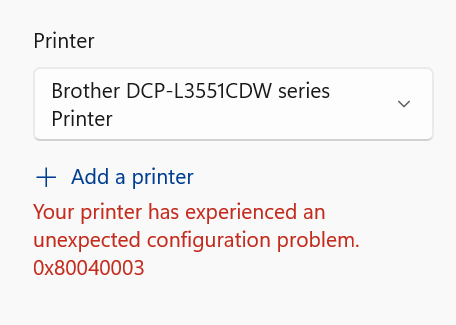
- Opening the modern Windows 10/11 Print dialog (e.g., in Windows Photos, Microsoft Edge, Notepad, or UWP/WinUI apps) displays:
Your printer has experienced an unexpected configuration problem. 0x80040003
- Running
Get-PrintConfiguration -PrinterName "<Printer Name>"in PowerShell fails withHRESULT 0x80070002(Could not access configuration information for the specified printer). - Windows Event Viewer (Applications and Services Logs → Microsoft → Windows → PrintService → Admin) logs Event ID 318:
Failed to upgrade printer settings for printer \\<PC-NAME>\<Printer Name>,LocalOnly driver ...\PrintConfig.dll. Error: 31.
Root Cause
dmDeviceName with local UNC prefix
PRINTER_INFO_8 (pDevMode) pointer to NULL (0x0)
When a WSD/IPP printer using the Microsoft IPP Class Driver (and an associated Print Support App such as Brother Print Support App) updates its device settings after a network re-announcement or Windows Update, the Default DevMode binary stored at:
HKLM\SYSTEM\CurrentControlSet\Control\Print\Printers\<Printer Name>\Default DevModecan be written with a local UNC path prefix (\\COMPUTERNAME\Printer...) in its 32-character dmDeviceName header. When the Print Spooler (spoolsv.exe) validates the DEVMODE via PrintConfig.dll, validation fails (Error 31) and the Spooler sets the printer's in-memory PRINTER_INFO_8 (pDevMode) pointer to NULL (0x0). Any modern app requesting a PrintTicket then fails with 0x80040003.
2. Method 1: Quick GUI Fix (No PowerShell Required)
Force Windows to regenerate and save a clean global Default DevMode (PRINTER_INFO_8) directly through the classic Printer Properties dialog:
- Press Win + R, type
control printers(orprintui.exe /s /t2), and press Enter — or go to Settings → Bluetooth & devices → Printers & scanners. - Click your printer (e.g. Brother DCP-L3551CDW series Printer) and select Printer properties (not Printing preferences).
- Switch to the Advanced tab.
- Click the Printing Defaults... button near the bottom.
- In the Printing Defaults window that opens, change any setting slightly (for example, toggle 2-sided or Color / Mono, then toggle it back), and click Apply → OK.
- Click OK on the Printer Properties window.
- Close and reopen the application you are printing from, then press Ctrl + P.
Tip: Clicking Apply inside Advanced → Printing Defaults... calls the Win32
DocumentPropertiesandSetPrinter(Level 8) APIs, which overwrites the corruptedDefault DevModein both the Print Spooler memory and the registry.
3. Method 2: Automated PowerShell Fix (Recommended)
If the GUI button does not trigger a write (because no setting was changed) or if you want an instant repeatable repair, run the following script in PowerShell (Administrator):
$PrinterName = "Brother DCP-L3551CDW series Printer"

$code = @'
using System;
using System.Runtime.InteropServices;

public class FixPrinterDevMode {
    [StructLayout(LayoutKind.Sequential, CharSet = CharSet.Unicode)]
    public struct PRINTER_DEFAULTS {
        public IntPtr pDatatype;
        public IntPtr pDevMode;
        public int DesiredAccess;
    }

    [StructLayout(LayoutKind.Sequential)]
    public struct PRINTER_INFO_8 {
        public IntPtr pDevMode;
    }

    [DllImport("winspool.drv", CharSet = CharSet.Unicode, SetLastError = true)]
    public static extern bool OpenPrinter(string pPrinterName, out IntPtr phPrinter, ref PRINTER_DEFAULTS pDefault);

    [DllImport("winspool.drv", CharSet = CharSet.Unicode, SetLastError = true)]
    public static extern int DocumentProperties(IntPtr hwnd, IntPtr hPrinter, string pDeviceName, IntPtr pDevModeOutput, IntPtr pDevModeInput, int fMode);

    [DllImport("winspool.drv", CharSet = CharSet.Unicode, SetLastError = true)]
    public static extern bool SetPrinter(IntPtr hPrinter, int Level, IntPtr pPrinter, int Command);

    [DllImport("winspool.drv", SetLastError = true)]
    public static extern bool ClosePrinter(IntPtr hPrinter);

    public static void Repair(string name) {
        PRINTER_DEFAULTS pd = new PRINTER_DEFAULTS { DesiredAccess = 0x000F000C }; // PRINTER_ALL_ACCESS
        if (!OpenPrinter(name, out IntPtr hPrinter, ref pd)) {
            throw new Exception("OpenPrinter failed with Win32 error: " + Marshal.GetLastWin32Error());
        }
        try {
            int size = DocumentProperties(IntPtr.Zero, hPrinter, name, IntPtr.Zero, IntPtr.Zero, 0);
            if (size <= 0) {
                throw new Exception("DocumentProperties size query failed: " + Marshal.GetLastWin32Error());
            }
            IntPtr dmBuf = Marshal.AllocHGlobal(size);
            try {
                // DM_OUT_BUFFER = 2: Ask driver to build a clean default DEVMODE buffer
                int res = DocumentProperties(IntPtr.Zero, hPrinter, name, dmBuf, IntPtr.Zero, 2);
                if (res != 1) {
                    throw new Exception("DocumentProperties(DM_OUT_BUFFER) failed: " + res);
                }
                PRINTER_INFO_8 pi8 = new PRINTER_INFO_8 { pDevMode = dmBuf };
                IntPtr pi8Buf = Marshal.AllocHGlobal(Marshal.SizeOf(pi8));
                try {
                    Marshal.StructureToPtr(pi8, pi8Buf, false);
                    if (!SetPrinter(hPrinter, 8, pi8Buf, 0)) {
                        throw new Exception("SetPrinter(Level 8) failed with Win32 error: " + Marshal.GetLastWin32Error());
                    }
                    Console.WriteLine("Successfully repaired global Default DevMode (PRINTER_INFO_8) for: " + name);
                } finally {
                    Marshal.FreeHGlobal(pi8Buf);
                }
            } finally {
                Marshal.FreeHGlobal(dmBuf);
            }
        } finally {
            ClosePrinter(hPrinter);
        }
    }
}
'@

Add-Type -TypeDefinition $code -ErrorAction SilentlyContinue
[FixPrinterDevMode]::Repair($PrinterName)

# Verify that configuration and PrintTicket validation now succeed
Get-PrintConfiguration -PrinterName $PrinterName
4. Verification Checklist
Run these two checks in PowerShell to confirm the printer configuration is healthy:
Check 1: Verify Get-PrintConfiguration
Get-PrintConfiguration -PrinterName "Brother DCP-L3551CDW series Printer"Expected Output:
PrinterName     ComputerName    Collate    Color      DuplexingMode
-----------     ------------    -------    -----      -------------
Brother DCP-...                 True       True       OneSided
Check 2: Verify .NET DefaultPrintTicket & Validation
Add-Type -AssemblyName ReachFramework, System.Printing
$server = New-Object System.Printing.LocalPrintServer
$queue  = $server.GetPrintQueue("Brother DCP-L3551CDW series Printer")
$ticket = $queue.MergeAndValidatePrintTicket($queue.DefaultPrintTicket, $queue.UserPrintTicket)
"DefaultPrintTicket Valid: $($null -ne $ticket.ValidatedPrintTicket)"
Expected Output:
DefaultPrintTicket Valid: True5. Preventing Future Recurrence
Because WSD (WSD-9551be14-...) dynamically switches between IPv4 and IPv6 link-local addresses, it can periodically trigger PrintConfig.dll re-upgrades when the printer wakes from sleep. To prevent WSD from corrupting the configuration again:
- Assign a Static IP / DHCP Reservation to the printer on your router (e.g.,
192.168.1.210). - Switch from a WSD Port to a Standard TCP/IP Port or install the Brother Full Driver & Software Package for
DCP-L3551CDWfrom Brother's official support page rather than relying on the genericMicrosoft IPP Class Driverover WSD.
About Copy And Paste
Just a curious soul dabbling in the world of IT. Exploring coding, sysadmin tricks, and tech automation — because who doesn’t love copying and pasting clean code that just works?
More in Tricks
Set Up a New Windows PC with WinGet: A Repeatable App Checklist
Install a small, explicit set of Windows tools with exact package IDs, record failures, and reuse your package list on the next PC.
Docker Disk Full? Find the Space Hogs and Clean Up Safely
Separate images, build cache, logs, and persistent data before reclaiming Docker storage. Keep the volumes and rollback images you still need.